Writing
Four Side Projects Later: What I've Learned About AI-Assisted Development
Lessons learned building four side projects with ChatGPT, GitHub Copilot and AI-assisted workflows.
From ChatGPT to Copilot
Four projects ago, I started deliberately experimenting with LLMs to see how far I could comfortably push them before they became more trouble than they were worth. I’ve had ChatGPT for a hot minute; it’s useful for exploring ideas, organising conversations, and just generally playing around with. Codex was a fun addition to the ecosystem, and it churns out boilerplate far faster than I ever could, so it’s become a regular in my toolbelt.
More recently, I’ve been exploring GitHub Copilot. Given my experience with ChatGPT, I had a bunch of preconceived assumptions and expectations about what it could and could not do, where the rough edges were and what I would realistically be able to achieve with it. Suffice to say, I’ve been proven wrong on most fronts. More on that later.
The Workflow
In my workflow, I’m the “ideas guy”, and ChatGPT turns them into something more realistic and tangible. Want to build a staff scheduling tool? That’s silly, says ChatGPT. Here are 5 different SaaS products that’ll do the same thing, but better. How about a browser extension to tell me which of the “Rewards” in my favourite “earn points for spending with us” platform are actually good value for money? Now, that’s an idea ChatGPT thinks is worth exploring, especially given my technical background, which puts it in the realm of “technically feasible”. An hour or two later and half a dozen iterations, I’ve got a browser extension that adds a little indicator to each “Reward”, quickly indicating which are worth my time and which are there to drain you of your points.
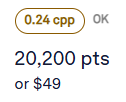

My little points-helper extension showed me that this workflow might help me tackle larger ideas, with a little fine-tuning. Copy-pasting code from ChatGPT into VS Code and then reloading the extension in the browser ad nauseam works fine for a basic augmentation extension. However, it’s not scalable to a larger, more complex extension, let alone a multi-file console application or a SaaS product. So, how do we bridge that gap? This is where Copilot comes in.
First, ChatGPT and I do some back-and-forth, make sure we’re on the same page, and really refine the idea. I get ChatGPT to do some market research and come up with a decent-sounding app name so that I can initialise a repository that won’t need a bunch of extra numbers and letters to make it unique. Then we lay the foundations - a solid copilot-instructions.md file, completely generated by ChatGPT. We’ll often add a few more documents too: a product plan, a data model, design principles, and architecture. It’s a collaborative process. ChatGPT guides some of my thinking, and I guide its output. We’re three side projects in, and this is working better than I expected. That’s not to say that it’s perfect, but it’s certainly impressive!
Foundations are a great first set of guardrails. The agent doesn’t go off hallucinating random features, architecture, etc., because it has some really clear guidance to work with. We can give it more help, though, in the form of Issues. I like to get some Milestones and Tags in place, but they’re not strictly necessary; I enjoy organisation. ChatGPT is great at breaking down the problem into bite-sized chunks that we can turn into Issues. They’re better than any Jira tickets that I’ve ever written. You can go back and forth on these too, but I generally copy-paste these into the repository without too much thought - a deliberate choice on my part, to see how far I can push things.
Once we have our Issues created, we can assign Copilot to them one by one (none of these projects is big enough for concurrent agents) and let it go to work. Eventually, it’ll come back with a draft PR that’s smashed all the requirements out of the park, without going off on any weird tangents (this is my favourite part). Initially, I’d take a quick look at the changed files, then mark the PR as “ready”, and a new agent would kick off a review. But wait, there’s more!
The reviews are super interesting; they pick up some great bugs that I probably never would have noticed. Occasionally, they’ll also pick up some inconsequential findings, but for the most part, they’re bang on. Once you’ve reviewed the findings (all nicely summarised in a GitHub Review), there’s a handy “Fix batch with Copilot” option that does all the heavy lifting. Credit where it’s due: GitHub has been consistently iterating and improving this review workflow over the last few months, and it’s improved every time. As of writing, you click the button, it pops up a modal with all the findings, lets you provide extra instructions, select the model, and even choose which findings should be actioned or ignored, then it spins up a new agent to do all the work.
So, three agents to implement one Issue (one to implement, one to review and one to fix review findings). That’s not too dissimilar to a human workflow, but without the overhead and context switching. I can easily see this scaling to tens or hundreds of repositories for an Enterprise workflow. The reduction in cognitive overhead is undeniable.
Now that we’re happy with the PR, we merge it; the linked Issue is auto-closed by the PR, and we repeat the process for the next Issue. You can interleave this process with manual testing/verification, or if you’re like me, just let it run its course and see what comes out the other end. I’ve been pleasantly surprised in most cases, and if I have any problems with the implementation, run into any bugs, or want to tweak something, I go back to ChatGPT to ideate and generate more Issues for Copilot to implement.
Things To Watch Out For
It’s not all roses, though. I’ve had ChatGPT generate some images or mockups that are exactly what I’m looking for, but when I try to get them into GitHub/Copilot, there’s some friction. Copilot can’t access images on an Issue, so you usually need to clone the repo yourself, commit the images and then get Copilot to implement the relevant Issue. A large refactor can sometimes cause hallucinations during the review process; it seems to get confused when there are too many changes, especially when working with datasets. Not a big deal, though, ignore 25/27 comments when fixing the batch, and it’s all back to smooth operations.
Final Thoughts
I’m one little browser extension and three more serious web-apps deep right now, and I’m having so much fun. I finally have the time to bring my ideas to fruition, I don’t have to fight with the latest, greatest framework, and for the most part, everything “just works”.
This experiment helped me figure out that LLMs can effectively participate in a software delivery process. Ideas become plans, plans become Issues, Issues become Pull Requests, and Pull Requests become working software. The human still provides direction and judgment, but the amount of effort required to turn an idea into something tangible has dropped dramatically.
I don’t believe “vibe coding” can replace disciplined engineering. Strong requirements, architecture, testing and review still matter. What has changed is the time required to get from a blank repository to something useful. Four side projects later, that’s the lesson I’m taking away from all of this.